
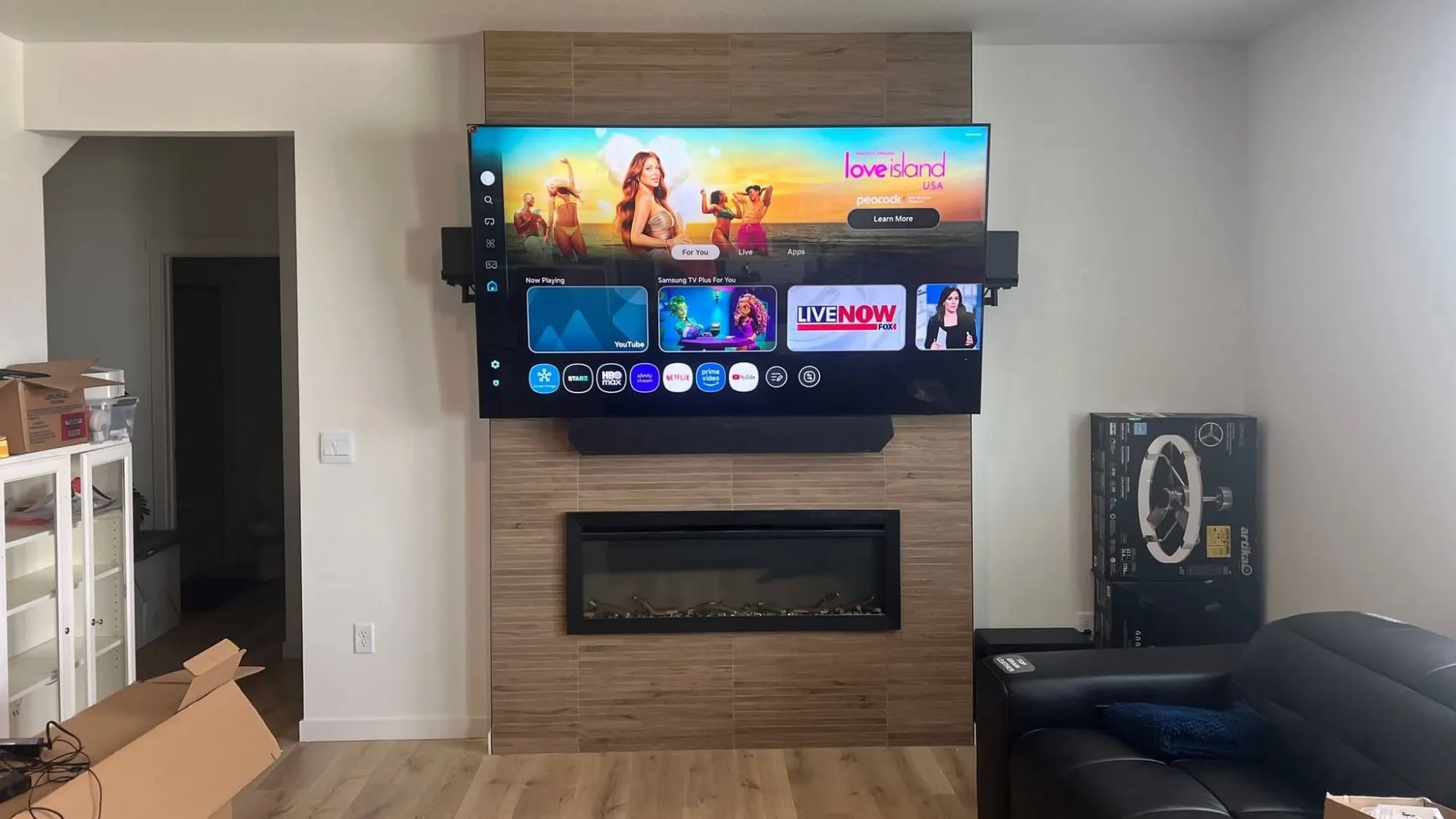
Soundbar Installation
Soundbar Installation Colorado Springs: Better Football Audio
A soundbar only fixes football audio when placement, mounting, connection, and settings are done correctly. This guide explains how soundbar installation Colorado Springs homeowners can rely on improves dialogue clarity. It also covers keeping the bar aligned with a wall-mounted TV and hiding cables without code shortcuts. Military and PCS families will find planning notes for Fort Carson, Peterson, Schriever, and the Academy.
TLDR: Mount the soundbar below the TV, following the manufacturer’s clearance specs. Use HDMI eARC when both devices support it, and keep speaker openings unobstructed. Never hide an ordinary power cord inside a wall. For soundbar installation Colorado Springs projects with complex walls, full-motion mounts, large TVs, or concealed wiring, use a professional installer who assesses the wall on site.
The Broncos are in prime time, and the living room is full. The picture on the big screen is sharp. Then the crowd roars on a third-down stop, and the play-by-play commentary disappears. Someone grabs the remote, turns it up, and the crowd just gets louder.
The 2026 season makes this a weekly test. The official 2026 Broncos schedule shows the team opened on Monday, September 14, at Kansas City. It hosts the Los Angeles Rams on Sunday Night Football on September 27 at 6:20 p.m. MDT. According to the Broncos’ schedule-release article, that game is one of three prime-time matchups in the first six weeks. The third is the Seahawks on Thursday Night Football on October 15.
Here is the technical reality. Buying a soundbar is step one. Placement, wall attachment, cable path, the correct ARC or eARC port, TV settings, and testing decide the result. Skip those steps, and the bar looks disconnected from the TV. The remote controls half the system, and cables hang below an otherwise clean install.
Why Football Exposes Weak TV Audio
Clear commentary vs. louder sound
Football audio is a layered mix. Announcers sit on top of crowd noise, stadium effects, and on-field sound. Thin TVs have little room for speakers, so many fire down or backward. Turning them up raises everything equally, so voices get louder without getting clearer.
What a soundbar adds to a flat-screen TV
A soundbar puts larger, forward-facing drivers in one cabinet near the screen. Many include a dedicated center channel for voices. CEDIA, the home technology trade association, describes a soundbar as a single speaker unit below the TV. It contrasts that with a surround system using multiple speakers around the room, typically 5.1 or 7.1.
When a soundbar is the practical choice
CEDIA notes that surround systems need more space and installation, while soundbars offer convenience and easier setup. For football, the priority is clear commentary anchored to the screen. A well-placed bar delivers that without running wire to rear speakers. Our Colorado Springs soundbar installation service handles the mounting, connection, and setup.
Put the Soundbar Where It Can Work
Below-TV placement as the starting point
The starting point is simple: center the bar just below the TV. Dolby’s 2017 Sound Bar Setup Guide says to place the bar “below your television at approximately ear level” and avoid obstructions toward the seats. See Dolby soundbar placement and connection guidance for the manufacturer view. That position keeps voices tied to the players on screen.
Clearance matters too. Sonos, for example, specifies a minimum of 4.0 inches (102 mm) between an Arc and the TV in its Arc wall mount guide. That is one documented example, not a universal rule. Always follow the manual for your specific model.
Watch the TV’s IR sensor, the small window that receives remote signals. A bar set too high can block it. Furniture matters as well. A console lip or shelf edge in front of the drivers muffles dialogue.
Wall construction decides the hardware. Many Colorado Springs homes use standard drywall on wood framing. Some rentals and multifamily buildings use metal studs. Tile and older plaster, often found on the south and west sides, need different techniques.
Masonry is a different install class entirely. It calls for a hammer drill and masonry-rated anchors. Everywhere else, the standard holds: mounted level, anchored to studs, no exceptions.
Fixed and tilt TV mounts
With a fixed mount, a wall bracket below the TV is usually the cleanest wall-mounted TV soundbar setup. The bar stays level and centered. A tilt mount changes the screen angle but not the bar. Check that the tilted TV’s bottom edge still clears the bar’s top-facing drivers.
Full-motion mounts and attached soundbar brackets
A full-motion TV mount swings, extends, and angles. A bar fixed to the wall keeps firing straight ahead while the screen points elsewhere. An attached bracket lets the bar move with the display. The combined weight must stay within the TV mount’s rating.
Illustrative scenario: An 85-inch TV in a Briargate home sits on a full-motion mount angled toward an open kitchen. A wall-fixed bar would keep firing straight ahead at the sofa. The fix starts by confirming the TV mount and a compatible soundbar attachment can carry the combined load.
The bar then attaches so it moves with the display, with manufacturer clearance maintained. Cable slack is managed so nothing pulls when the arm extends. ARC or eARC, dialogue, and lip sync get tested in both positions. Any soundbar setup for a wall-mounted 85-inch TV starts with those numbers, and mounting an 85-inch TV and soundbar follows the same process.
Atmos and side-firing speaker clearance
Some bars use upward-firing drivers that bounce sound off the ceiling. Others use side-firing drivers aimed at nearby walls. Dolby’s setup guidance says upward-firing drivers need a clear line of sight to the ceiling. It advises against mounting them in a cabinet or under a soffit. Side-firing drivers need open space at each end.
The table below compares common mounting positions and what each one requires.
| Position | Suited For | Advantages | Risks or Trade-Offs | Installation Check |
|---|---|---|---|---|
| Below fixed TV | Most wall-mounted setups | Voices anchored to the screen; clean look | Must clear the IR sensor and picture | Manufacturer clearance, level, stud-mounted or rated anchor |
| Below tilt TV | TVs mounted higher on the wall | Screen angle adjusts to seating | Tilted bottom edge may crowd drivers | Clearance checked at full tilt |
| Attached to full-motion mount | Screens that swing or angle | Bar moves with the display | Added load on the mount arm | Combined weight within rating; compatible bracket |
| On media console | Rentals and no-drill setups | No wall penetration | Console lip, sensor blockage, visible cables | Bar at front edge; drivers unobstructed |
| Above TV, only when manufacturer and room require it | Layouts where below-TV space is blocked | Keeps the area below clear | Sound arrives from above the screen | Manufacturer approval; angle per manual |
Below-TV placement wins in most rooms. The other positions solve specific problems, so pick them for a reason, not for convenience.
Use the Right Audio Connection
HDMI eARC
HDMI eARC (enhanced Audio Return Channel) sends TV audio back to the soundbar over one HDMI cable. According to HDMI Licensing Administrator, eARC supports audio up to 192 kHz, 24-bit, plus uncompressed 5.1, 7.1, and 32-channel audio. It also supports Dolby TrueHD, Dolby Atmos, DTS:X, and DTS-HD Master Audio. Review the HDMI eARC capabilities for details.
Those capabilities require compatible equipment at both ends. A good HDMI eARC soundbar setup uses the labeled ARC or eARC port on the TV and the bar. Not every HDMI port qualifies. Then enable ARC or eARC, set the TV’s audio output to external speaker, and turn on HDMI-CEC.
HDMI-CEC (Consumer Electronics Control) lets one remote send commands across HDMI. Brands give it different names in the settings menu. No installer can honestly guarantee Atmos, a specific format, or one-remote control. Those results depend on the TV, the bar, the source, and the broadcast.
HDMI ARC when eARC is unavailable
Many older TVs have ARC but not eARC. ARC still returns TV audio over HDMI and supports CEC control. It carries fewer high-bitrate formats than eARC. For a typical football broadcast, ARC often handles the job well.
Optical as a practical fallback
Optical digital audio uses a light-based cable. It is simple and avoids HDMI handshake problems. It does not carry CEC, so volume control may need the bar’s own remote. It also lacks the high-bitrate formats eARC supports.
Why Bluetooth is not the default TV connection
Bluetooth works well for music from a phone. For TV audio, it can add delay that shows up as lip sync drift. Connections can also drop or reconnect to the wrong device. IHFS sets up Bluetooth audio when it fits, but a wired connection comes first for game day.
This table summarizes the four connection options and what to check for each.
| Connection | Primary Use | Main Advantage | Main Limitation | What to Verify |
|---|---|---|---|---|
| HDMI eARC | TV and soundbar that both have eARC | One cable; high-bitrate formats; CEC control | Both devices and ports must support it | Labeled eARC ports; eARC and CEC enabled |
| HDMI ARC | TVs without eARC | One cable; CEC volume control | Fewer high-bitrate formats | Labeled ARC ports; TV output set to external speaker |
| Optical digital | Older TVs or ARC problems | Simple and stable | No CEC; limited formats | TV optical output and audio format setting |
| Bluetooth | Phone music and casual listening | No cable run | Possible delay and dropouts | Pairing, lip sync, reconnect behavior |
Use eARC when both devices support it, and ARC when they do not. Optical is the fallback, and Bluetooth is for music.
Tune the Setup for Football
Start with dialogue, voice, or sports mode
Most bars include a dialogue, voice, or sports mode. These modes typically lift the vocal range so commentary rises above crowd noise. Names and behavior vary by brand. Start there before adjusting bass or treble. No universal EQ setting exists, so the manual is the reference.
Run the manufacturer’s room calibration
Many bars include room calibration. It uses a microphone to measure the room and adjust the output. Run it after the bar is in its final position. Moving the bar later means running it again.
Check lip sync and remote control
Lip sync means the voice matches the mouth on screen. If it drifts, check the audio delay settings on the TV and bar. Then confirm the TV remote controls power and volume. If it does not, recheck CEC and the port.
Test with actual game footage
Test tones do not sound like a stadium. Play recorded game footage with heavy crowd noise. Listen from the main seats at normal volume. Commentary should stay clear without riding the volume button.
The table below maps common football audio problems to safe checks and clear escalation points.
| Symptom | Likely Check | Safe Homeowner Step | Professional Installation Trigger |
|---|---|---|---|
| Commentary buried by crowd noise | Sound mode, placement, blocked drivers | Turn on dialogue or sports mode; run calibration | Bar needs repositioning or wall mounting |
| No audio | Wrong port or TV output setting | Use the ARC/eARC port; set output to external speaker | Settings are correct but audio still fails |
| TV remote won’t control volume | HDMI-CEC off, or optical connection | Enable CEC on the TV and bar | CEC fails across devices after setup |
| Lip sync off | Audio delay setting or Bluetooth link | Adjust delay; switch to a wired connection | Drift persists on a wired connection |
| Sound disconnected from screen | Bar too far from the TV or off-center | Center the bar below the screen | Needs a wall bracket or mount-attached bracket |
| Visible power and HDMI cables | No concealment plan | Use a surface cable cover for now | In-wall routing, listed power kit, or new outlet |
Most settings problems are safe to check at home. Anything involving drilling, walls, or power is where a professional assessment starts.
Hide Soundbar Cables Without Shortcuts
Power cords vs. in-wall rated signal cables
Two kinds of cables run to a soundbar. The power cord carries 120-volt electricity. Signal cables carry audio and data, such as HDMI, Cat6, and speaker wire. Signal cables can go in the wall when they carry an in-wall rating, such as CL2 or CL3.
NEC 400.12 and concealed flexible cords
The power cord follows different rules. The National Electrical Code restricts flexible cords and power-supply cords from running through holes in walls. It also bars them from being concealed by walls, floors, or ceilings. See the NEC 400.12 restrictions on flexible cords for the code background.
A factory power cord does not go inside the wall. Interpretation rests with the local authority having jurisdiction (AHJ), the official who enforces code where you live. That is the only way to hide soundbar wires in a wall legally: signal cable in-wall, power through a listed system.
Listed soundbar power and cable-management systems
Listed kits solve the power problem. PowerBridge publishes soundbar-specific systems, including Model SBCK, designed to pair with its TWO-CK kit. PowerBridge states the SBCK is certified to UL Standards 498 and 514C and installs only with its ONE-CK or TWO-CK kits. These kits use in-wall rated power wire and receptacles, so the factory cord stays outside the wall.
Hardware choice depends on wall construction and the bar’s power supply. That approach defines IHFS code-compliant cable concealment and soundbar cable concealment. Clean cuts, hidden cables, zero compromises.
When a licensed electrician is required
Some jobs go beyond a listed kit. New outlets, new branch circuits, and hardwired 120-volt work belong to a licensed electrician. IHFS does not perform that work. When a project needs it, the assessment flags it before any cutting starts.
Local Area Specifics
Military OneSource lists Fort Carson, Peterson SFB, and Schriever SFB in its Colorado military installation information. Around each one, PCS timing, housing rules, and wall types shape the install. Veteran-owned military TV and soundbar mounting is built around those constraints. Housing and lease rules differ by property, so confirm current written permission before anyone drills.
Fort Carson, Fountain, and Security-Widefield
On-post quarters vary by construction era, and some walls may be block rather than stud. Off post, homes in Fountain and Security-Widefield are commonly wood frame. Removal planning matters when the next PCS is a few years out. For local details, see TV mounting near Fort Carson.
Illustrative scenario: A Fort Carson family lives off post near Fountain. The TV is already mounted, but the soundbar sits on a low console with HDMI and power cables in view. Commentary feels detached, the remote works inconsistently, and the next PCS requires a clean removal.
The fix starts with written housing or lease permission and identifying the wall construction. The bar is centered below the TV per its manual. The labeled ARC or eARC ports are connected and the settings enabled. Cables follow an approved plan, with a listed in-wall method if power is concealed.
The outcome: an aligned bar, tested with game footage, with the cables gone. The mounting footprint is documented for move-out.
Peterson, Schriever, Falcon, and the Powers corridor
Off-base housing near Peterson is often newer construction along the Powers corridor. That usually means drywall over wood framing. Schriever families often live in Falcon and along the east edge of town. On-base housing varies, so wall type is confirmed on arrival. See Peterson SFB TV mounting for the area.
Air Force Academy, Briargate, Monument, and Black Forest
Academy assignments tend to run longer, so families often ask for permanent, fully concealed setups. Briargate and Monument include many newer builds with predictable framing. Black Forest homes vary more, including custom construction and larger rooms. Longer stays make listed in-wall power kits a practical choice.
Cheyenne Mountain, Broadmoor, Old Colorado City, and Manitou Springs
Cheyenne Mountain Space Force Station is a work site, not a housing area. Crews often live on the south and west sides of town. Those neighborhoods include older homes with plaster, brick, and stone. Broadmoor homes often feature stone fireplaces and larger displays. Old Colorado City and Manitou Springs include historic construction that calls for slower, careful anchoring.
This table groups common scenarios by area so you can plan the right first step.
| Area or Installation | Common Scenario | Wall or Housing Consideration | Next Step |
|---|---|---|---|
| Fort Carson, Fountain, Security-Widefield | PCS move; TV mounted, bar on console | Block walls possible on post; lease rules off post | Get written permission; send wall photos |
| Peterson, Schriever, Falcon, Powers corridor | Newer home, first full setup | Wood frame common off base | Confirm wall type; plan cable route |
| Air Force Academy, Briargate, Monument, Black Forest | Longer assignment, permanent setup | Newer framing; custom builds vary | Plan full concealment with a listed kit |
| Cheyenne Mountain, Broadmoor, Old Colorado City, Manitou Springs | Older home or stone fireplace wall | Plaster, brick, or stone | Schedule an on-site assessment |
| On-base housing at any installation | Quarters under housing office rules | Rules and wall types vary by property | Confirm current housing policy before drilling |
Wall type and permission drive most local decisions. Photos and model numbers sent ahead make the visit faster and cleaner.
Practical Application: Game-Day Setup Checklist
- Confirm model numbers and ARC/eARC ports. Write down the TV, soundbar, and mount models. Find the labeled HDMI ARC or eARC port on each.
- Check placement and driver clearance. Measure the space below the TV against the manual. Note any top- or side-firing drivers.
- Confirm bracket compatibility. Match the bracket to the bar, and to the TV mount if attached.
- Verify wall and mounting method. Identify drywall, metal stud, plaster, tile, or masonry before choosing hardware.
- Plan power and signal-cable routing. Keep the factory cord outside the wall. Use in-wall rated signal cable and a listed power kit.
- Enable settings. Turn on ARC or eARC, external speaker output, and HDMI-CEC.
- Test dialogue, lip sync, and remote. Use recorded game footage from the main seats.
- Document a PCS-friendly setup. Photograph bracket locations and note the hardware used for move-out.
Homeowner can check: model numbers, ports, TV and soundbar settings, sound modes, lip sync, and remote behavior.
Needs a qualified assessment: drilling, unknown wall construction, heavy displays, fireplace locations, and concealed power.
PCS version: confirm housing permission, wall type, the number of TVs, and move-out expectations. Decide whether the bar should stay attached to the TV mount for easier removal.
Every visit follows the same phases, though the time for each depends on the room.
| Phase | Work Performed | What Can Extend the Visit | Customer Preparation |
|---|---|---|---|
| Compatibility check | Confirm TV, bar, bracket, and port specs | Missing model numbers or bracket | Send model numbers in advance |
| Wall and placement assessment | Locate studs, identify wall type, measure clearance | Masonry, tile, plaster, metal studs | Clear the wall and nearby furniture |
| Bracket installation | Mount the bracket level, stud-mounted where possible | Heavy displays or full-motion arms | Have the bracket and hardware on site |
| Cable-routing and power plan | Route in-wall rated cable; install a listed power kit | Fire blocking, insulation, obstructions | Written housing or lease approval |
| ARC/eARC or optical configuration | Connect ports; enable settings and CEC | Firmware updates or older TVs | Have all remotes on hand |
| Testing and cleanup | Test dialogue, lip sync, and remote; clean up | Retesting after firmware changes | Queue up recorded game footage |
No universal completion time applies. Model numbers and wall photos sent in advance remove most of the unknowns.
Frequently Asked Questions
Is a soundbar enough for watching football?
For most living rooms, yes. Football depends on clear commentary, and a well-placed bar with a center channel handles that. CEDIA notes that full surround systems need more space and installation. For game day, placement and settings matter more than extra speakers.
Should a soundbar go above or below a wall-mounted TV?
Below is the starting point. Dolby’s guidance places the bar below the TV at about ear level, with nothing blocking it. Above-TV placement makes sense only when the manufacturer supports it and the room requires it. A fireplace or low console can create that case.
Is HDMI eARC better than optical for football audio?
eARC carries more formats and supports CEC remote control over one HDMI cable. Optical is reliable but does not carry CEC or high-bitrate formats. HDMI eARC setup for football audio requires eARC ports on both devices. Optical remains a solid fallback on older TVs.
Why is there no sound after connecting the HDMI cable?
The cable is often in the wrong port. Use the port labeled ARC or eARC on both the TV and the bar. Then set the TV’s audio output to external speaker and enable ARC or eARC and HDMI-CEC. If sound still fails, a firmware update or a different cable is the next check.
Can a soundbar move with a full-motion TV mount?
Yes, with a compatible attachment. Sony’s SU-WB1, for example, lets four select Sony soundbars swivel with a Sony TV, up to 21 degrees, on a compatible Sony wall mount. That bracket works only with specific Sony models. No universal bracket fits every TV and bar, so compatibility and combined weight come first.
Can the soundbar power cord be hidden inside the wall?
Not the factory cord. NEC 400.12 restricts flexible cords from running through walls or being concealed by them. A listed in-wall power kit is the compliant path, and signal cables need in-wall ratings. Your local AHJ has the final say on interpretation.
Can IHFS install soundbars near Fort Carson and Peterson SFB?
Yes. IHFS handles soundbar installation near Fort Carson and soundbar mounting near Peterson Space Force Base. The service also covers communities around Schriever SFB, the U.S. Air Force Academy, and Cheyenne Mountain Space Force Station. Base access procedures and housing rules are confirmed during scheduling.
What should military families check before mounting in base housing?
Start with current written permission from the housing office or landlord. Confirm the wall type, the number of TVs, and move-out expectations. Ask whether the bar should stay attached to the TV mount for easier removal. No install is damage-free, but a small, repairable footprint is a realistic goal.
Does IHFS install soundbars in Briargate, Falcon, Monument, and Black Forest?
Yes. IHFS provides its soundbar mounting service across Briargate, Falcon, Monument, and Black Forest. Newer homes in these areas often have predictable framing, while custom builds vary. Every wall is confirmed on site before drilling.
How long does soundbar installation take?
It depends on wall construction, bracket type, and cable-concealment scope, so there is no universal completion time. Send model numbers for the TV, soundbar, and mount, plus photos of the wall. Pricing varies based on TV size, wall construction, mount type, soundbar model, bracket compatibility, and cable-concealment scope. Call 719-426-2613 or book online for a project-specific quote.
Key Takeaways
- Placement comes first. Center the bar below the TV, near seated ear level, per the manufacturer’s clearance specs.
- Connection decides control. Use the labeled HDMI eARC or ARC port, then enable external speaker output and HDMI-CEC.
- Clearance protects performance. Keep drivers, the IR sensor, and upward- or side-firing speakers unobstructed.
- Legal cable concealment matters. Signal cables can go in-wall with CL2 or CL3 ratings, but factory power cords cannot.
- Military housing needs a plan. Confirm written permission and wall type, and plan for a small, repairable footprint at move-out.
- Know the professional triggers. Drilling, unknown walls, heavy or full-motion displays, fireplaces, and concealed power call for an on-site assessment.
Ready for Game Day: Soundbar Installation Colorado Springs
IHFS is owned and operated by Mike Hawkins, the Air Force veteran behind IHFS. He served in Air Force Security Forces and started IHFS in 2019. As a veteran-owned soundbar installer in Colorado Springs, he works to one standard: precision over speed. Every install is insured and code-compliant, and it is work worth showing.
Customers rate IHFS 5.0 across 144 Google reviews and 4.9 across 422 Thumbtack reviews. One installer, one standard, on every job. That also covers military TV mounting Colorado Springs families schedule around a PCS move.
Call 719-426-2613 or book a Colorado Springs soundbar installation. Send model numbers and wall photos, and the plan starts there.
I Hang Flatscreens. Mounting TVs the right way across Colorado Springs and the surrounding military community since 2019. One installer, one standard, on every job. 719-426-2613 | ihangflatscreens.com